Potain MA 13 with V1 processor and remote


Had to verify where the jumpers were at on the processor and then match that up with the chart attached and change the dip switches in the remote to get it to work.

This will just get the remote to talk to the crane but doesn’t mean the display will work.  In this case they didn’t match and I had to order new card for processor which is easier to change out then the remote card.


11 dip jumpers to dipswitches


MRH deadman button not working

Operator complained the deadman button wasn’t releasing. 

The bell crank that operates the deadman switch pin broke.  The temporary fix was to remove the top of the joystick and button and manually lift the deadman lock pin. When the technician was able to arrive on site a T85 joystick was used in place of the MRH joystick until replacement parts were made.  The Deadman contact is different from a T85 stick and so the contact switch needed to be swapped.

Potain has switched design on the replacement joysticks, so a new bell crank was made

and reinstalled into the old joystick and reinstalled into the crane.


Liebherr 81k.1 Radio Remote Receiver

The cord for the antenna got cut and we could not get the receiver to send out a signal.  It has power but on the front of the receiver, there are LED lights.  We had power but not the second light down.  It is red until it hooks up with the remote then it goes green.  We called HBC and they had us remove the cover and check all the fuses there is a very small 1 AMP fuse shown in the picture.  It had a red led next to it which meant it was blown.  We soldered a jumper with a 5 amp fuse around it and it all worked.
It doesn’t matter what length the antenna cable is for connecting to the remote.


Liebherr 81k.1 won’t swing or trolley

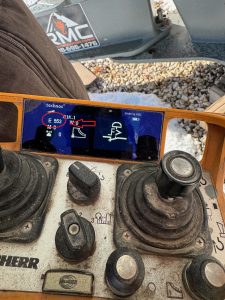
The operator called and said the crane would not swing or the trolley have him send a picture of the remote.  IT had E 39 on it.  Looked it up and found that it was in the forbidden zone.  Had to turn key for zoning in the side panel to override the zoning and drive the crane out of the zone then switch the key back to make sure the zoning was back on.

Disabling AMCS Anti-Collision

After another crane is removed from the job site, this is the procedure to disable AMCS anti-collision system

Locate the main AMCS

Switch off the silver toggle

Disable Anti-Collision in the CCS Configuration Menu (an “X” through the icon means its disabled)

Fuel Computer Menu

Start Computer, and choose user Rod Kesler

Click on AFC icon on desktop

Login as user: afc  and password: afc

Click on Setup/Configuration to access all tabs to be edited

Once changes are made, you to send files to outside control box.  Click on Transfer Data, and Transfer All Tables to AFC

Wait for progress bar to complete, and verify changes on control outside


Unlisted Technician Videos

This playlist is only accessed by having a direct link. Do not share this link with anyone outside of RMC

Technician library playlist

  1. Hup CAN control card install
  2. Liebherr working electrical panel
  3. Holder Tractor service reset
  4. ACS380 Drive warning reprogram
  5. High gain receiver dip switch programing –V3 Remote control
  6. Basics of AMCS
  7. How to remove contactor from Din rail
  8. Weathervane microswitch replacement
  9. How to manually change Liebherr I/O’s from the PLC


MDT – Tech Tip Videos

MDT Tech tip Playlist

Below is a library of videos. If you have a customer with one of these issues, send them the link to our Youtube channel to help free up your time.

LMI Fault Troubleshoot – Crane won’t start, how to access the fault stack Youtube Link

LMI service code – How to enter a service code using the LMI Youtube Link

Loss of cab power – Instructions to check for tripped circuit breaker Youtube Link

Turning off slew encoder – How to enter the VFD to turn off the slew encoder Youtube Link

Checking Correct Power and Phase – Where to look for the correct phase Youtube Link

Switching from 4 part to 2 Part – How to switch the hook block Youtube Link

Custom operator controls – How to change or adjust the operator controls Youtube Link

Emergency hoist release – How to lower a load without crane power Youtube Link

CCS Serial number lookup – How to lookup the serial # in the processor Youtube Link

Inputting a new serial number into CCS – How to input a new serial # into the processor Youtube Link

Manual weather vane – How to put Topless cranes into weather vane manually Youtube Link 

Wireless Remote Diagnostics – How to check the functionality of the wireless remote Youtube Link 

Weathervane detection microswitch replacement – How to locate and remove the weathervane detection microswitch. Youtube Link