Slew, Trolley, and hoist drives begin start sequence, then power down. Check incoming power. It is possible L1 of the circuit isn’t there, but the other two legs will be the ones providing 48V and 24V to feed processor and start sequence. It will be backed up by the U100N not being powered.
Slow Trolley, Hoist
81K Crane hoist speed was slow. (no zones, Load plus was turned off) hoist speed was the same as if the micro movement button was pressed. The crane threw code E2647 DC undervoltage
Found the generator idle speed switch was at Low, flipped the switch to High restarted the crane.
Maintenance mode
Bringing the crane down in maintenance mode for checking the trolley or replacing hoist rope. It is not in the manual to do this. You need to push the escape and the down arrow on the LOGO to bypass all sensors then you will need to jumper the banana bar in the back.
How to move trolley in mounting
When in mounting to move trolley you need to push the auxiliary button on the side of the remote wait for the Hydraulic pump to stop and then you have functions of trolley in. In order to get trolley out you have to by pass all the sensors on the LOGO by holding down the down arrow button and the esc button.
Phase Monitoring Relay added
There has been a phase monitoring relay added to Liebherr 81K.1.
It monitors voltage (high and low), frequency (high and low), phase loss and phase order. The display will show all 3 lines of voltage, and relay status. If the relay opens it will shut off crane the same as an e stop, and the message on the remote will show E stop pushed. The display of the relay will flash and an error message will display above the voltage read out.
RL1.PL – Phase loss (one leg is no producing voltage)
RL1.PR – Phase Reverse (Phase order needs changed)
RL1.OV – Over voltage
RL1.UV – Under voltage
RL1.OF – Over frequency
RL1.UF – Under frequency
FLT.INT – Voltage interruption
FM Gru Electrical Schematics
When look at a component in the electrical cabinet or wire, the number indicates what page in the schematics that the component can be found at. For example, 6U1 is the hoist inverter (VFD) found on page 6. Wire #1503 is found on page 15 and is wire# 03 in a sequence.
S=Hoist (pg 6)
R=Slew (swing) (pg 9)
C=Trolley (pg 12)
 F=Brake
KL= Safety validation for the drives
FM Gru will not start
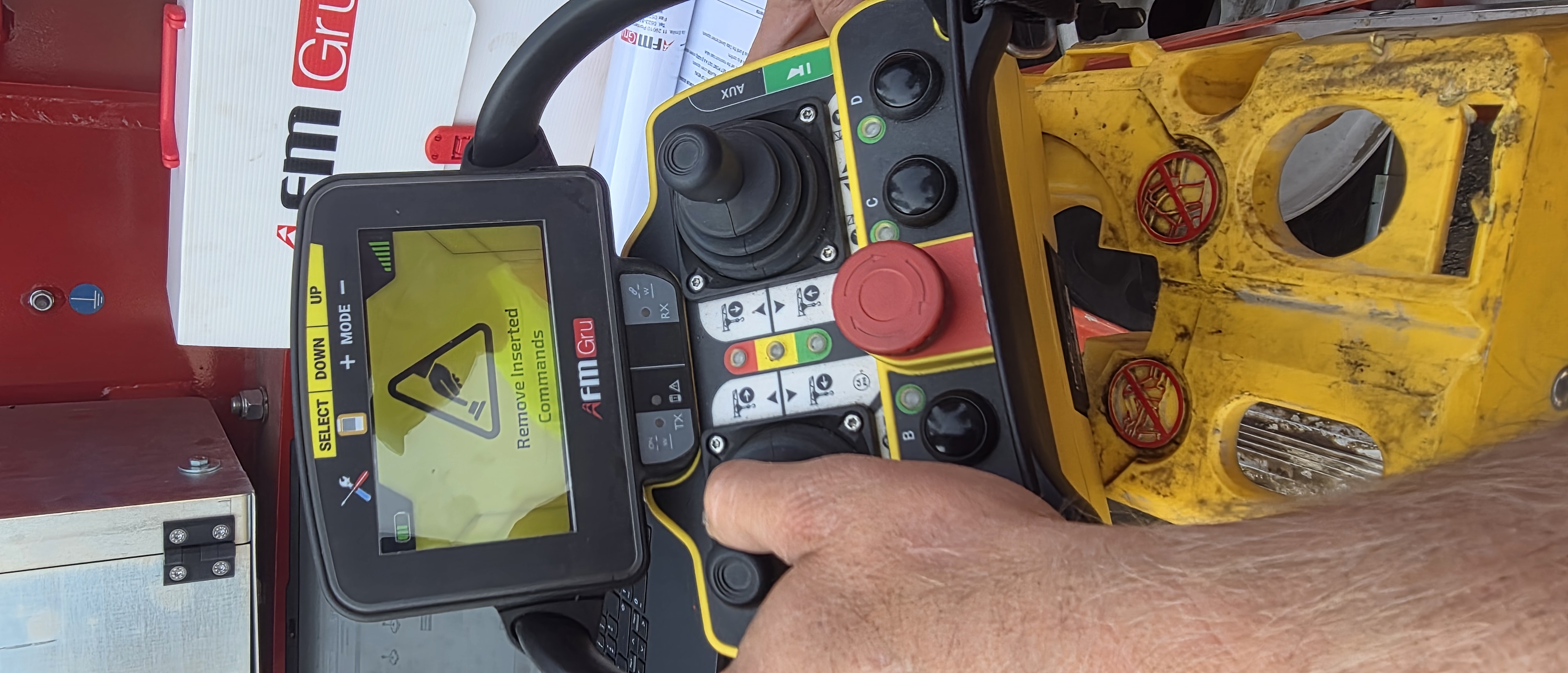
Crane will not start with remote control and display shows “Remove Inserted Commands”
A joystick is out of adjustment and not returning to neutral. Can try and clean connections on the back of joystick, or use app to recalibrate remote.
Potain HDT 80 in luffed postion
With the new Autec remote from CLS you must jumper the hoist and the trolley if you want the postion to be on switch 8.
103 to 104 Trolley
and
35 to 36 Hoist
These where each running through the U902N (Gold Box) and when the switch was in position 8 running through K938A
Potain HDT80 400953 RMC Crane edited wiring diagram for Luffed
T85 starts and immediately shuts off
Crane would start normally, but during start up of drives crane would shut off. Erection screen was inaccurate, because crane would not start up. Faults showed 1-213-001, fault with communication with U213X. U213X had green run and I/O lights. Unplug H5, H6, and H7 (hoist, slew and trolley).
Crane would start and run. Plugged in hoist cable, restarted crane-it worked. Plugged in trolley cable, restarted crane-crane would work. Plugged in slew cable, restarted crane-crane would shut off. Problem could be slew cable, Canopen card in drive or drive itself.
De-rating a crane via Potain Connect Access App
Derating is available in Potain Connect thru the Remote Configuration menu. The submenu Crane Performance Limitation will be the menu where you make the adjustment. Toggling the button from off to on is the first step in the process. From there, a popup window will appear asking you to validate your selection. This will reduce both moment and load to 50 percent. Remotely this is the only option for derating the performance. For deactivating the limitation, it is the reverse process.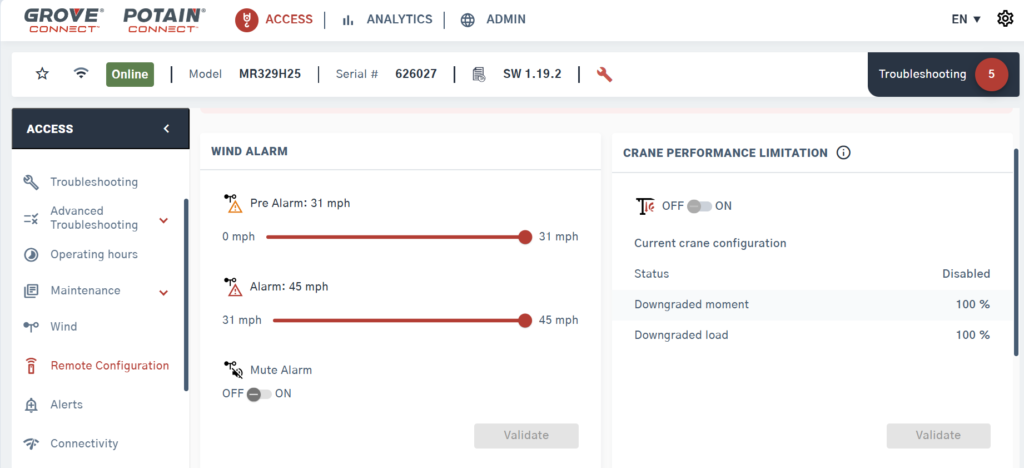
If the crane is off when you make the limitation selection, the limitation will turn on or off with a few second’s delay. If the crane is turned on, the action of activating or deactivating will not occur until the crane is turned off the next time.
There is no pop-up window on the operators display for limitation when the limitation is done remotely. The operator will see the max pick weight decreased and moment % increase