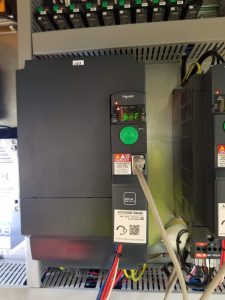
LI1-Trolley out command
LI2-Trolley in command
LI3-2nd Speed
LI4-3rd Speed
LI5-Cab control
LI6-All limit switches are good
R terminals are brake control
LI1-Trolley out command
LI2-Trolley in command
LI3-2nd Speed
LI4-3rd Speed
LI5-Cab control
LI6-All limit switches are good
R terminals are brake control
brF shows on the drive
CCS code (remote and panel) 00008 28944 “brake chopper”
Brake microswitch is out of adjustment. Bottom lock nut backed off. Readjust switch as per manual (click link below), test and operates as it should.

Hoist Brake Microswitch (S409S)
Igo T85 stopped hoisting as well, neither up or down. brF on hoist drive. Reset brake microswitch.
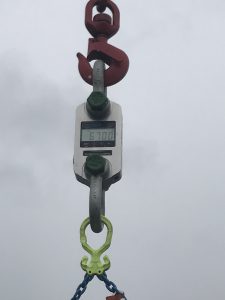
Weight of Nelson axles with T85 top kit and spare tire 6500#
Put the T85A top kit on the axles with 6 holes showing from the rear.
Put the HUP top kit on with 8 holes showing from the rear.
Weight is 6700# with spare tire 
Go to Maintenance Menu, and then to Maintenance Interval – press ENTER. Scroll to Hourly, pres ENTER. Scroll down to Maintenance Interval showing that it needs completed, and press ENTER to put a check mark next to it. ESC to Main Screen.
Have to clear active faults on CCS. Go to Teach and Program to enter code. Press ESC once and go to Maintenance. Press ENTER twice for each fault displayed.
ALWAYS pull wire ropes by hand when replacing. Especially for the initial reeving.
Even though the actuator weathervanes the crane, the light does not come on. There is a microswitch on the back of the slew motor. Proper adjust by the manual would require removing the slew motor. For a field fix, remove the cover (see previous post for proper removal). With the cover removed, take crane out of weathervane (slew brake set). There is an adjustable plate that contacts the microswitch when activated. Loosen the screw with a 8mm wrench and pull the contact plate up towards the microswitch. Tighten slightly more than finger tight. Activate the weathervane and verify the light comes on. If it comes on, take the crane out of weathervane and tighten completely. Replace cover as outlined in the previous post.
When towering up, mast locks are extended but the orange validation button does not appear. S934S does not close. Jumper 24 VDC to G5 and horn honks and validation button appears. Mast lock switches should look like this (folio 11):
Mast locks extended:
S933S 0 (open)
S934S 1 (closed
Mast locks retracted:
S933S 1(closed)
S934S 0 (open)
Will update once crane is down and switches are tested