When 24V system shorted out, computer reset to 00/00/00 and 00:00.
Go into system date to set time and date, and then can change General Preferences to region time.

Rocky Mountain Crane Service Logs
When 24V system shorted out, computer reset to 00/00/00 and 00:00.
Go into system date to set time and date, and then can change General Preferences to region time.
Serial number 602585
Justen from CLS called and said the remote was showing Comm Error. Talking with Tomas, it is the data being sent from receiver to the remote (transmitter) for the display. Check the connection at the receiver with the red antenna for loose or corrosion at the connection. Also, check inside the remote there is an antenna that can come loose or fall off. If all looks good, need to replace both receiver and transmitter.
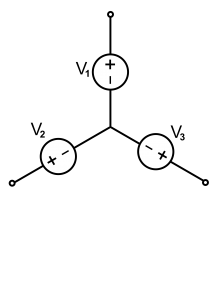
Pictured is a standard “Wye” connection. First test is the “megger” test which measures resistance to ground. Should be 800-900 Mega ohms (MΩ) resistance (our tester reads up to 500 Mega ohms)
In theory they all share the neutral in the middle, and testing only 1 leg should be sufficient, but this isolates each leg
Next test is a resistance of the windings for each leg
Final test would be current draw on each leg, but would require an amperage clamp and ability to run motor continuously.
Menu 3-5-5
LI1-Trolley out command
LI2-Trolley in command
LI3-2nd Speed
LI4-3rd Speed
LI5-Cab control
LI6-All limit switches are good
R terminals are brake control
brF shows on the drive
CCS code (remote and panel) 00008 28944 “brake chopper”
Brake microswitch is out of adjustment. Bottom lock nut backed off. Readjust switch as per manual (click link below), test and operates as it should.

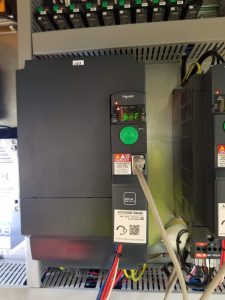
Hoist Brake Microswitch (S409S)
Igo T85 stopped hoisting as well, neither up or down. brF on hoist drive. Reset brake microswitch.
Put the T85A top kit on the axles with 6 holes showing from the rear.
Put the HUP top kit on with 8 holes showing from the rear.
Go to Maintenance Menu, and then to Maintenance Interval – press ENTER. Scroll to Hourly, pres ENTER. Scroll down to Maintenance Interval showing that it needs completed, and press ENTER to put a check mark next to it. ESC to Main Screen.