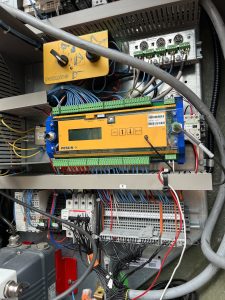
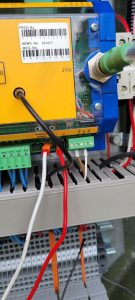
trolley on display had a ??? Which made AMCs not work. Wires were pulled out of 3 and 5 on the analog on processor
Rocky Mountain Crane Service Logs
trolley on display had a ??? Which made AMCs not work. Wires were pulled out of 3 and 5 on the analog on processor
While Programming the CCS for Top Zone on Submenu (66) the crane will not accept the 10 digit Activation code. And will not change from (Zone not activated) to (Zone activated). The crane doesn’t know its serial number. You need to go to Submenu (60 Mounting then to Serial) then put in the serial number. Once you put the serial number in you need to go back to the Top Zone programming in the CCS and follow the steps in reprogramming the Top Zone.
To activate Top Zone go to page 5-171 in your operators manual and follow the steps, to be able to set your Zones. After activating Top Zone in the CCS, you need to go in to teachin-program on your remote and set your degree point. Then you should be able to create your Zones.
Remote won’t start crane just saying search link on led screen on remote. couple of steps to try to get the remote to link up with crane.