
HUP Radio Remote How to check working order of remote
Checking working order of HUP Joysticks
This explanation is not correct. In order to test the switches and joysticks of the remote, you must do the following in order.
- Turn key off
- Depress Emergency Stop Switch
- Press and hold ESC button next to jog dial
- Turn key back on
- Continue holding ESC button until the proper diagnostic screen is displayed
- Twist Emergency Stop Switch until it pops back up
- Now you should have proper display of the working order of the switched and joystick
HUP Radio Remote Description of Buttons
Adjusting Brake and Microswitch for Weathervane on Tower
GME CCT MENU CCS MENU
Crane starts but will not swing
Frequency drive starts and immediately shuts down, with code AFE1 (emergency stop)
Operator sent over following screen with active fault
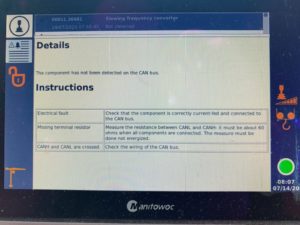
Had to force K600M to stay energized (pressing in on the blue tab behind the plastic cover) to access drive and turn slew motor encoder to Partial Open Loop. (74.12)
Crane would start up and run, but operator didn’t like swing characteristics. To be expected, the slew drive is no longer receiving feedback from the motors, and is estimating speed and direction.
Replace slew motor encoder, and all is good.
**Note from Denis** Make sure and protect the shield with heat shrink or tape, as it can cause a short
If the motor encoder is internally shorted, the drive may not operate in partial open loop as it tries to protect itself. If this is the case, unplug the 2 connectors from the slew drive and reprogram parameter 90.46 to Force Open Loop.
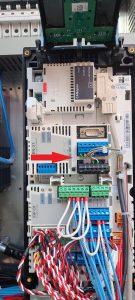
Error messages on CCs would be Slewing Frequency Converter lost (00011.20482) or Slewing Frequency Converter not detected (00011.20481)
Plug Ins not Working In Cab
Operator called and Plug Ins inside of cab not working. Also, had a number of errors are were Open Circuit.
Q104F Circuit Breaker was tripped. (Only blue breaker in the cabinet)
Trolley starting, but suddenly stopping
Trolley position could be set during Teach In, because it bypasses all encoders, but after completion and it Normal Operation Mode it would stop suddenly. Found encoder box was not adjusted properly and the gear whell on the encoder box was not turning with trolley winch. Readjust, and had to re-teach.
Could not calibrate Moment sensors
During erection, could not validate 0 moment in Teach In. Both moment sensors were reading 0 mA. If moments sensors are too close or too far away, they will be “out of range” and read 0 mA. Need to be adjusted by gap once the crane is in the air and all of the weights are in.
5.5 mm is what it needs to be set at.
Thanks J MF P