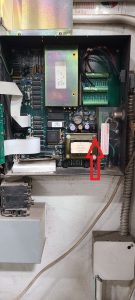
Placing KEB Drive in Degraded Mode

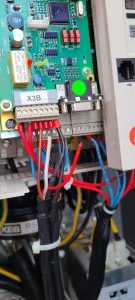
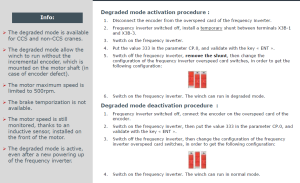
To place KEB drive in a mode where it does not look for speed sensors, must be placed in Degraded Mode.  Follow the steps in link below and also steps to put back into normal mode.

Can not apply more than 30% of speed or drive will shut down.  (E66 code in degraded mode)

KEB Drive Degraded Mode

On MDT389, this did not work.  Here are the other procedures, per JP.

75HPL Degrade Mode Instructions

Holder – Service Reset

Use the laptop to reset the service reminder.  Otherwise need to reprogram parameters in ECU.   Once you scan for ECU’s, need to click Get Data for each

Go into parameters and to section 1.1.4 (AHyd)

New Holder (w/ High Flow) 8119 Bit Code

Older Holder (w/o High Flow) 7047 Bit Code

Change language to Language 1 (German), and check parameter 1.4 Telematik should be turned to NO

Click the SAVE button to the RIGHT of Device Data


Crane will not start

When pressing the start button, green circle on LMI display toggles between circle and square, but does not try and start up drive.  Only fault code was Motor Heating Circuit held open too long.  Disable motor heating in configuration options screen.

Heater not Working in Cab of MDT219

Operator called and complained that the heater in the cab was not working.  Wipers worked, and when switched over to AC the light would come on but no fan.

Had the operator power down the crane and unplug the KP plug and plug it back in.  Heater started working again.

In case needed:

Q131A Heater Circuit Breaker

Q340A & Q342A Wiper Circuit Breakers

Q362A AC Circuit Breaker