
When cutting something out on the plaz the torch will start cutting and drop it’s tip into the metal plate. Which you will then have a fault and will have to reset. If your settings are correct on your programming the tip of the torch there is something wrong with it and needs to be replaced.
Potain IGO T85 Hydraulic Motor not working
Was trying to tower up and let Jib retaining rope out. Toggle on my remote was to the right on mast. Hydraulic motor would not come on and wasn’t able to let out the Jib retaining rope. Breaker Q940M was not tripped. Looked at my Erection aid and where S916S & S918S was just —- Which it should have been reading S916S. Switches were good, checked B911N (Inductive control detector of retaining winch) will also put —- if it’s not reading correctly. Had 48V at G27. K916A was not Acted on. Had 48V at K916A. Wiggled contactor and orange plunger on K916A was Acted on. Erection Aid was reading S916S. Hydraulic motor and Jib retaining rope started working. Need to probably replace K916A
Hoist motor operates slow MDT 389 (Degraded Mode)
Operator gave hoist up command, Brake release felt sudden and hard, Followed by a very slow hoisting up or down. Some cases the crane would kick the operator out shortly after the hoist function was given. When the crane faulted E.65 was displayed on the KEB hoist drive.
New Encoder was ordered
Hoist drive was placed in to Degraded Mode 
Replaced hoist Encoder, 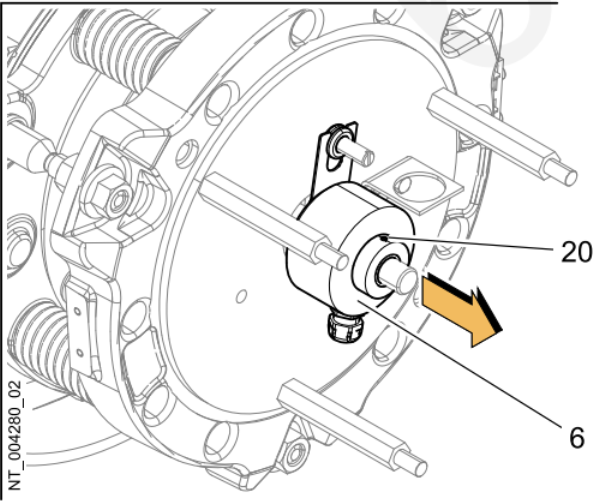
Took hoist drive out of degraded mode and normal operation resumed.
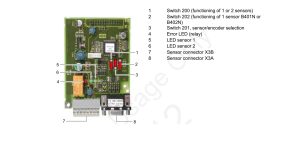
219 stuck on 99% moment
Crane won’t go to 100% moment and load. Can’t change it from 99% to 100% on the display for your maximum moment and load. Need to go to the CCT U246X and put in your tech code then go change the moment and load to 100% then you can go change it on the display in teach in and crane configuration. To access it on The CCT
5. CODE (put in your tech password) then
2. CONFIGURATION
2.4 MOUNTING
24.6 DERATING 246. Load 100%
246.Moment100%
24.7 POWER CONTROL 247. 100%
New HUP 40/30 won’t go into maintence mode
Tried using Crane CCS code to get into maintence mode and it remains locked.
Must use technican CCS code to get to that menu
See attached for Access rights for either Crane code for Technican Code
Hup Time & Date show 0
Time shows 12:00AM and date shows 1/1/00. Fault (00024.00083) show SCM date and time incorrect.
Enter Mounting Menu (6). Enter System Date Menu (5) Reset date and time.
This is for older HUP’s that use 4 digit password.
Vicario will only hoist in 1st speed
When going into 2nd speed or faster, drive will fault. Trolley and swing still work at full speed.
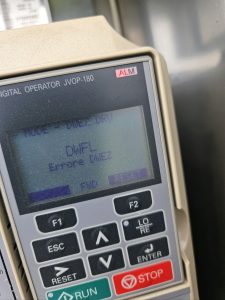
DWFL displayed on Drive
The speed sensor is not reading the speed of the hoist drum. Need to make sure no dirt or grease is preventing the speed sensor from reading properly.
If everything is clean and clear, may be a bad speed sensor, you can change a parameter to ignore the speed sensor
Liebherr Jib pin
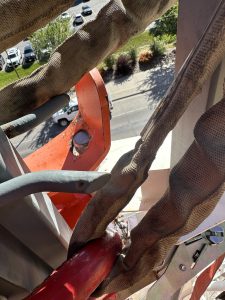 Need to make sure you pull down on the cable that is attached to the jib release pin while folding up jib. It can get stuck and not slide properly and will bend plate. Which won’t latch properly.
Liebherr auxiliary motor went down.
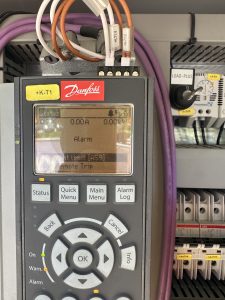
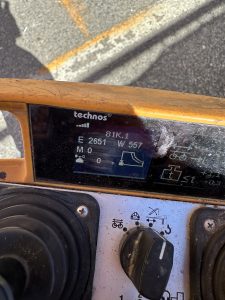 When trying to fold the jib out it would stop and throw an error on the remote E 2651. Which means Torque limit motor reached. When using the motor it was putting out 11 to 15 amps before kicking out. A good motor at full speed puts out 5to 8 amps while working properly. You can find your amp pull right on the drive +k-T1. Replaced aux motor and was drawing 7 amps
All drives shut off, when raising jib after telescoping
After telescoping to the correct height, went to raise jib to 0 degrees, and all the drives would shut off. It would go down, but wouldn’t come up. Tomas said on “SOME” T85’s and “SOME” generators (pre-emission), the jib reatining winch can trip the phase detector. Jumper the 2 red wires together in 1 slot (11 & 14), and bypass phase detector. Once operation is complete move wires back.