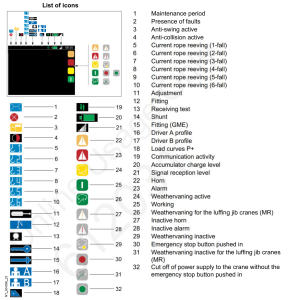
While Programming the CCS for Top Zone on Submenu (66) the crane will not accept the 10 digit Activation code. And will not change from (Zone not activated) to (Zone activated). The crane doesn’t know its serial number. You need to go to Submenu (60 Mounting then to Serial) then put in the serial number. Once you put the serial number in you need to go back to the Top Zone programming in the CCS and follow the steps in reprogramming the Top Zone.
Top Zone on a HUP
To activate Top Zone go to page 5-171 in your operators manual and follow the steps, to be able to set your Zones. After activating Top Zone in the CCS, you need to go in to teachin-program on your remote and set your degree point. Then you should be able to create your Zones.
Hoist shows tJF instantly and won’t move
Voltage is reading 488 volts. It’s too much voltage. Need to reprogram hoist drive per service bulletin.TJF Service Bulletin
Hup – Tech Tip Videos
Below is a library of videos. If you have a customer with one of these issues , send them the link to our Youtube channel to help free up your time.
Hup remote Functions – Remote button, switch and screen displays. Youtube Link
VFD Location and Error code – Location of VFD’s, Breaker locations, and Where to look for error codes. Youtube Link
Hup Handheld remote – How to plug in and start crane with wired handheld remote Youtube Link
Checking power – How to check voltage at the filter. Youtube link
Manual weather vane – How to manually engage weather vane and confirm it is in weather vane via the remote Youtube Link
Automatic weather vane – how to activate the weather vane with push button Youtube Link
Hoist block and trolley at end of shift – Where to place the trolley and hoist block to help when ice/snow accumulation develops Youtube Link
Fast Charge Battery – How to remove and install batteries Youtube Link
Taking out of weather vane – How to get into work mode and confirm you’re out of weathervane. Youtube Link
Daily inspections – Base Level, Power cable inspection, Wire rope inspection, Trolley inspection Youtube Link
Start instructions – How to start with a generator, connect remote and confirm connection Youtube Link
Weathervane to working mode confirmation – Hup with dual slew motors. Youtube Link
Wireless Remote Diagnostics – How to check the functionality of the wireless remote Youtube Link
Hup Tower Locking Pin Adjustment Location
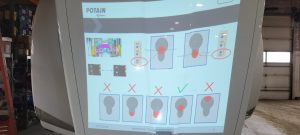
HUP 32/27 Narrow Stance
Low Maintenance Position For HUP
How to fold out jib on HUP as long as it has new software update when the crane is folded up or axles. Note that support is needed to be able to do this at the end of the first jib section.
Also attached is how to fold out without new software
HUP will not accept Zero Load
After software upfate, in which SCM and CCT were erased, crane would not accept Zero Load during teach in. Need to repair loadpin, and re teach Zero load.