HUP Radio Remote How to check working order of remote

Checking working order of HUP Joysticks

This explanation is not correct.  In order to test the switches and joysticks of the remote, you must do the following in order.

  • Turn key off
  • Depress Emergency Stop Switch
  • Press and hold ESC button next to jog dial
  • Turn key back on
  • Continue holding ESC button until the proper diagnostic screen is displayed
  • Twist Emergency Stop Switch until it pops back up
  • Now you should have proper display of the working order of the switched and joystick

HUP will not enable Top Site

Went through the procedures several times, but would not turn on Top Site.  Serial number was not in CCS computer.  Program serial number and Top Site now works.

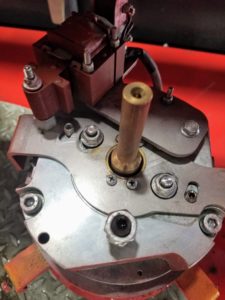
Weathervane on releasing on Hup (Slew Brake not engaging)

Need to raise handle on brake and slide cam plate (lock plate) into position.  Lift up on brake handle, and the plate should return to the “unlocked” position automatically.

Video showing proper operation

If not, remove weathervane coil plate with the 2 bolts, but be careful as the return spring is underneath it.  Remove the 4 screws holding the lock plate in place and clean bottom of lock plate and surface below it on the brake coil.  When reinstalling, make sure that the nut on the weathervane coil is not too tight, as it can interfere with free movement.

Hup Brake Exploded Diagram


Hoist Motor Not Working in Very Cold Temperatures

TA20-236-A – Operating mode for TUN function ATV320 on HUP cranes_EN (2)


Suggestion per France

Here is a procedure for making a motor tune on the ATV320 hoisting motor drive.

In green : menu and parameters of the drive HMI.

For this operation, the crane must be in « work » configuration.

Unlock the hoisting drive :

Mod (Non) / Cod- / Cod / enter : 2024

(press esc, esc, esc to go back to the main menu)

Change command channel from CANopen to terminal (needed for manual tune ) :

Conf / Full / Ctl- / Fr1 / change Can for AI1 (looks like A11) Must Scroll to the left 

Make the motor tune :

Conf / full / Drc- / ASY- / Tune change No for YES then press enter for 5 seconds to launch the tune.

Check that the tune is done

Conf / full / Drc- / ASY- / TUS this parameter displays Done if the tune is well done.

If possible note the new value of RSA parameter  (unable to do)

Conf / full / Drc- / ASY- / rSA read and note the value.

Re-change the command channel from terminal to CANopen

Conf / Full / Ctl- / Fr1 / change AI1 for Can