Removing outer jib, 104ft IgoT85

After you bring the crane into maintenance mode and get it in the position to start taking the Hydraulic cylinder,  jib attachments, and jib off.  The operator manual disassembly instructions do not match the actual process to remove the outer jib.
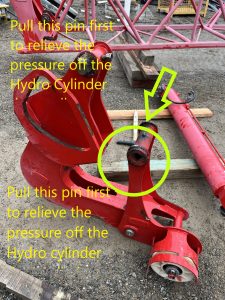
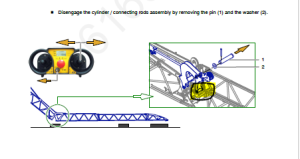
With the pictures above the picture from the manual tells you to pull this pin to get the cylinder off.  Which there is to much pressure on the cylinder to get that pin out with out possibly bending the Jib on the crane. When you get to this step of taking the Hydraulic Cylinder off you will want to revert to the edited picture above and pull that pin first.

The operator manual disassembly instructions do not match the actual process to remove the outer jib. When removing the outer connecting rod/hydraulic assembly, there is no need to remove the pulley pin and roller assembly as detailed in this step.
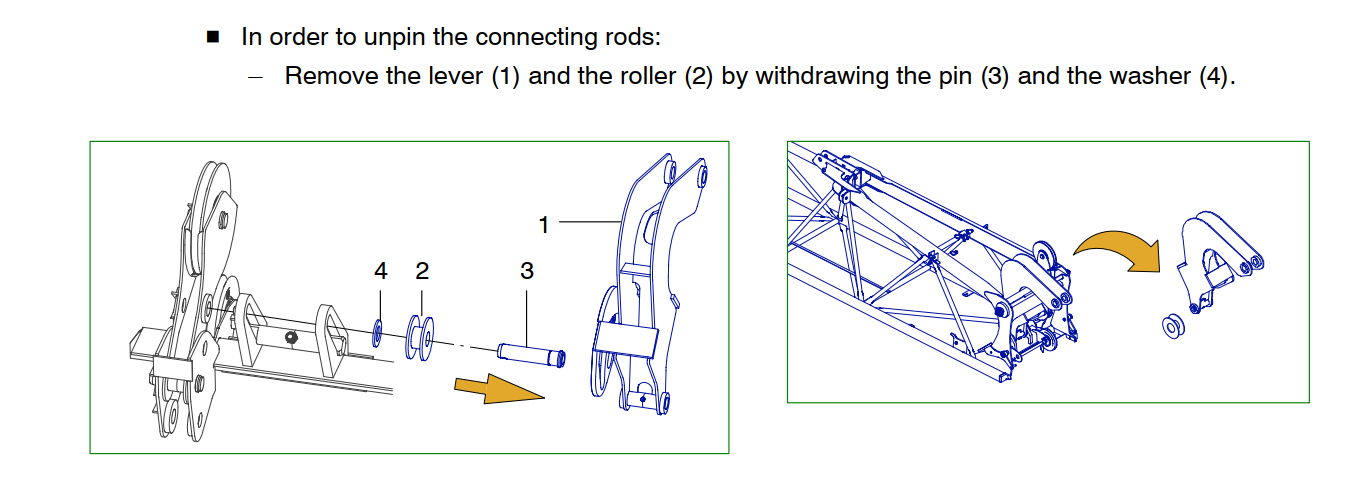
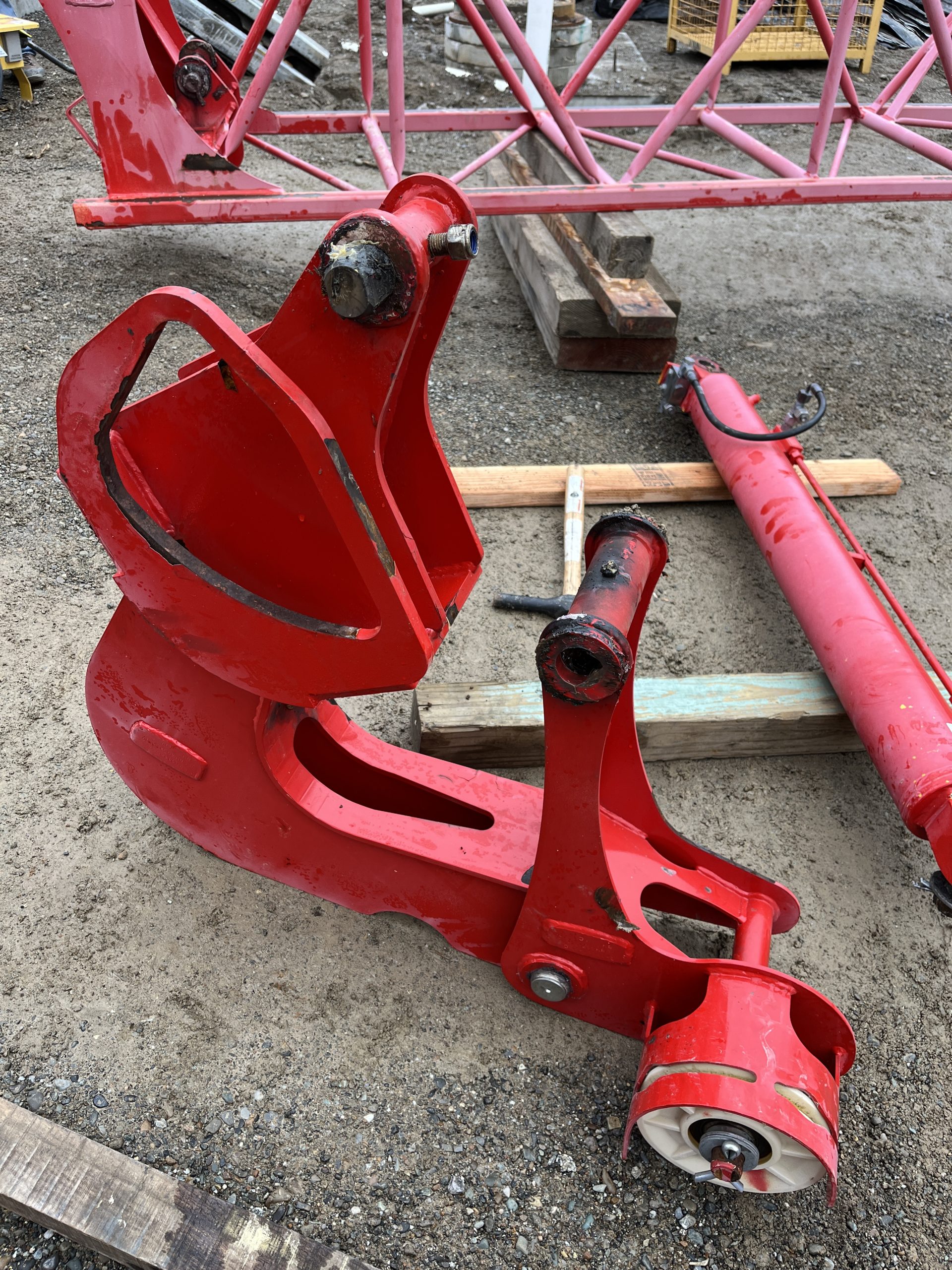
The connecting rod (4)(image below) pivots on a special pin with a through bolt. To remove the connecting rod (4) Remove the through bolt, slide out of the connecting rod pin (4) The sheave assembly that is detailed in the image below (1) is separate and will unpin without any interference from the Connecting rod (4)  
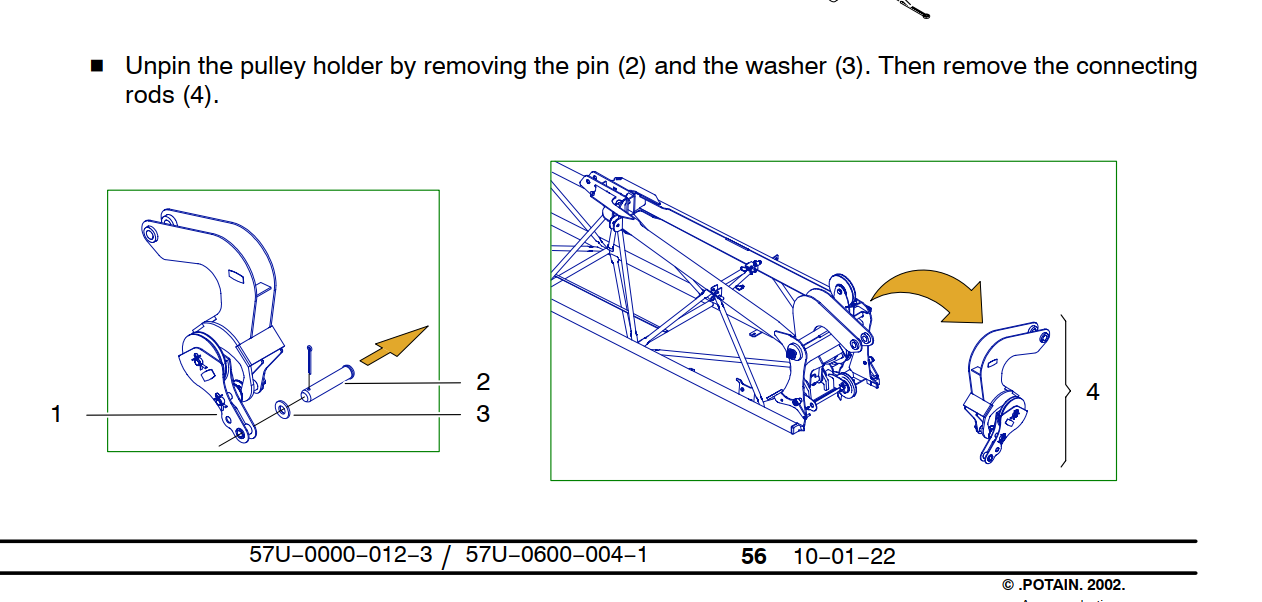
Jib hinge, Connecting rod, jib removal

The connecting rod pin fits into a slotted rail, the pin needs to be at the bottom of the rail and turned 1/4 turn to be removed. (Note the trolley cable sheave is installed and pined into place. The pin required to pin the sheave is the same pin used to hold the pulley holder (1) in place. There is some paint in the I.D. of the holes, it is recommended to install the pin first with anti-seize to help drive out the paint before installing the sheave. )
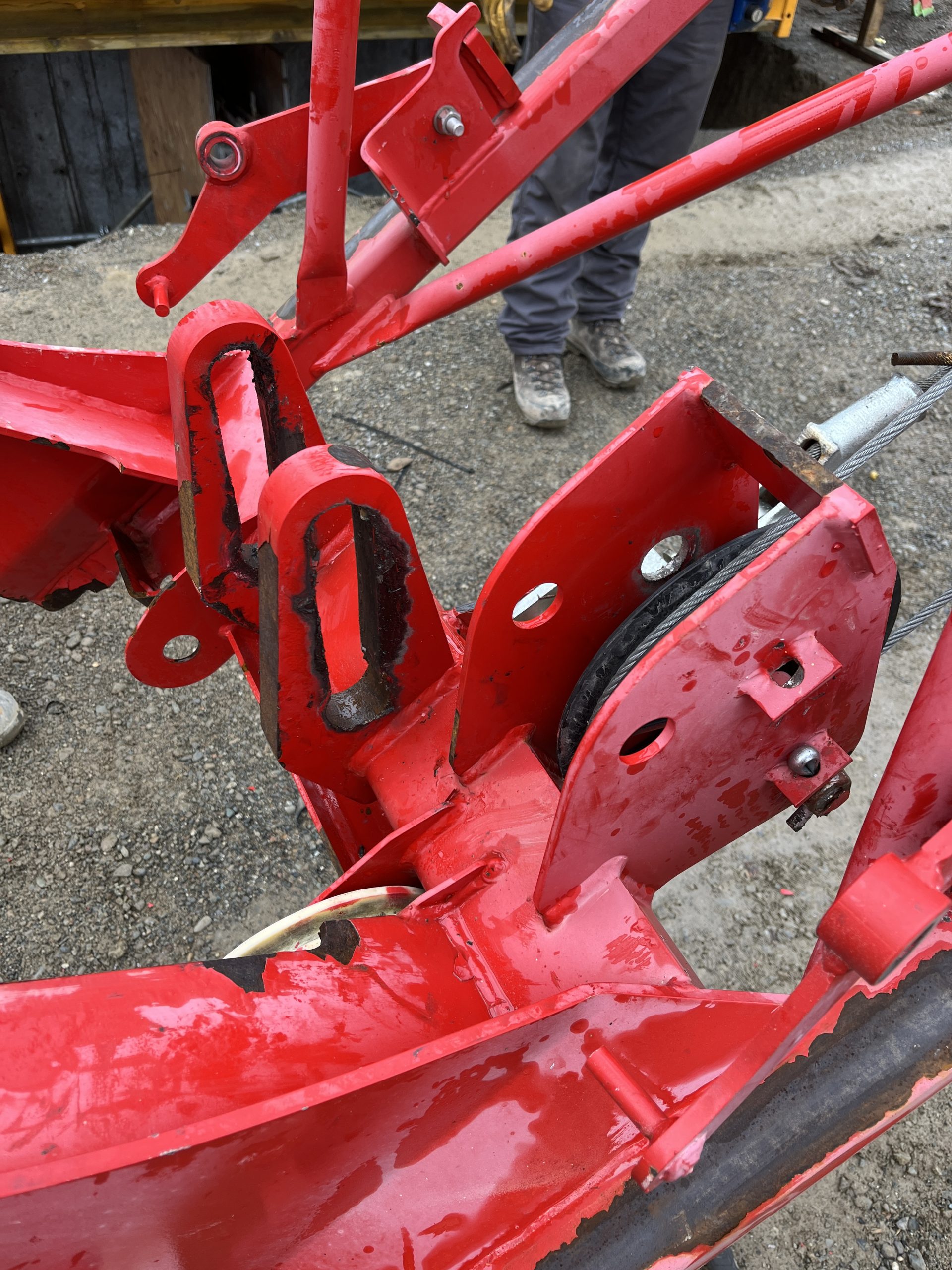
The connecting rod assembly can be removed without completely disassembling the assembly as detailed in the instructions.

 

3381 code on Slew Drive

According to ABB drive manual

Code: 3381

Fault: Output phase loss
Programmable fault: 31.19

Probable Cause: Motor phase loss
Motor circuit fault due to
missing motor connection (all
three phases are not
connected).

What to do:  Connect motor cable.

K600M contactor was not energizing

High Powered Antenna Channel Change

Had a customer that was loosing remote function while on the job and had full battery and full signal.  It would lose signal and go to the Potain Screen

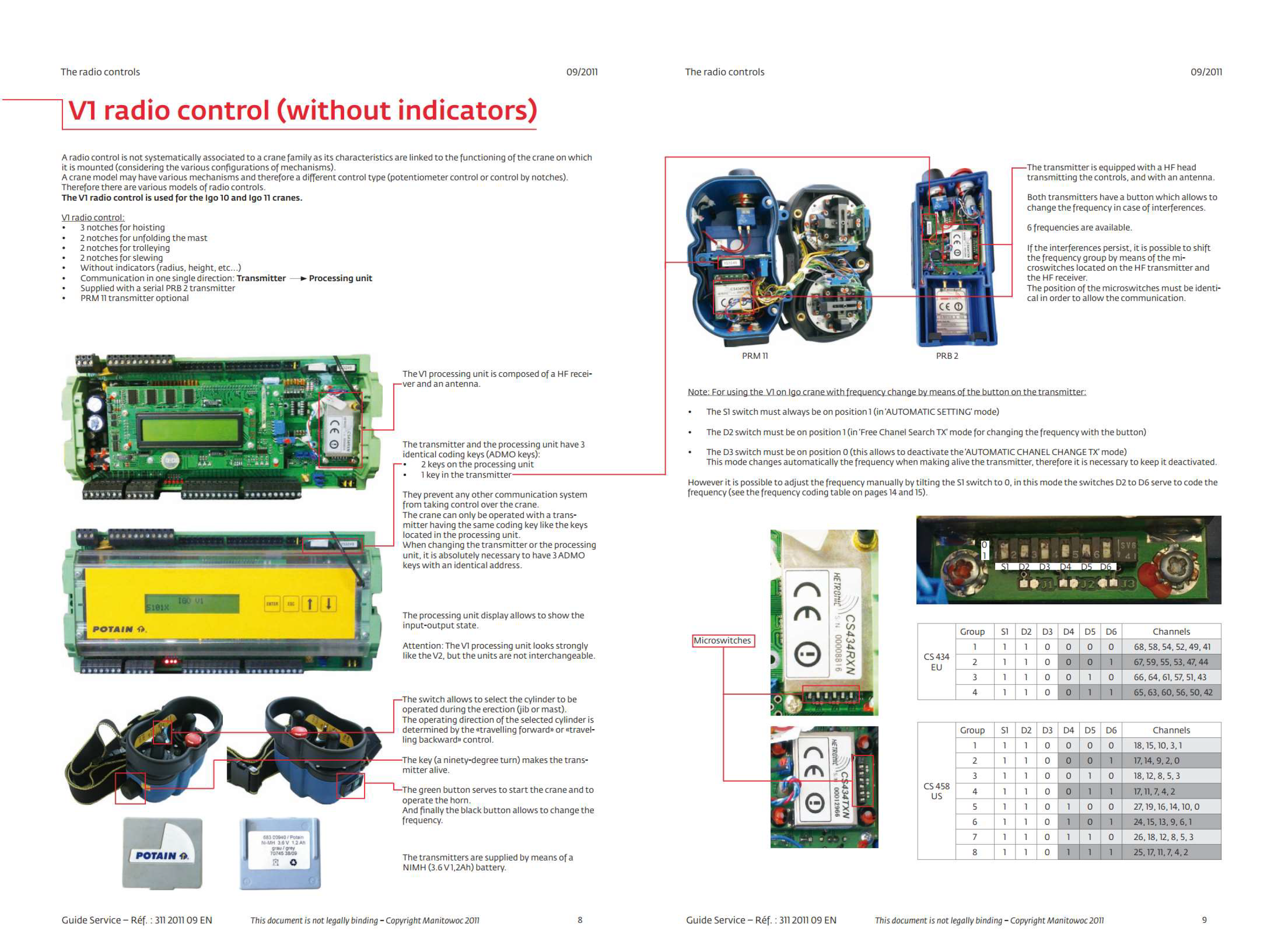
We tried lots of different things and eventually ended up changing the channel on the remote.  If you change the channel on the remote you must also change the dip switches on the high powered antenna.  See post about that.

Please note that it is possible to just switch groups and still be on the same channel which does nothing.  Changing the group does not necessarily mean that you change the channel.  For example channel 3 is both apart of group 1 and group 3.

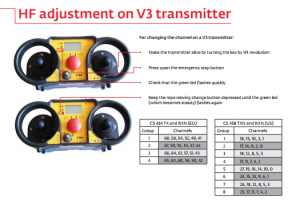
To change the channel on the remote

Remote off

Estop down

Hold 2 part 4 part button next to screen Turn on remote

U230X Processor not powering on.

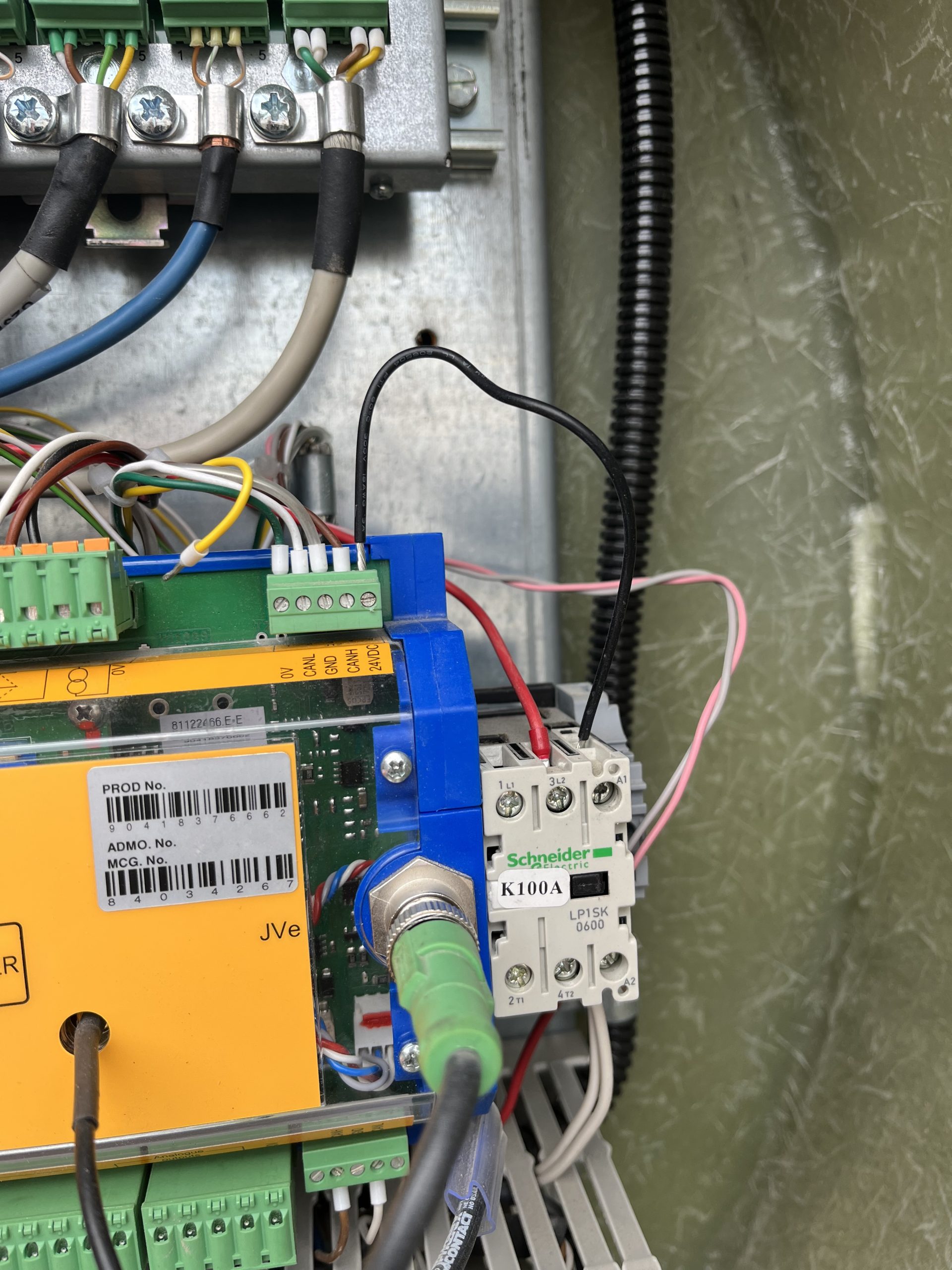
Customer complaint was that the crane would not connect to the remote. It was found the U230X Processor display wasn’t on, but the light shining on the processor was on. A voltage reading of 50V was taken at the J1/2 and continuity reading was taken at J1/1.  It was noted that K100A wasn’t energized. A voltage reading at J12/5 was taken and found a reading of 0Volts

The U230X has an internal fail safe that if there is something wrong with the start sequence it will not power on. In this instance all outgoing connections were removed until only the J1 Connection was left connected to the processor. The crane was powered on and the processor powered up showing information on the display. One by one each J connection was added until the processor would not power on. It was found that the J12 connection was the offending connection. The 24V connection at J12/5 was removed at the processor and and the crane processor powered on.  The crane was once again powered down and a continuity reading was taken from the J12/5 wire to each J12 connection. It was found that the J12/5 was making contact to the J12/1, J12/3, and chassis ground. The customer inspected the KK plug for a connection error and it was found the wiring to the KK plug was compromised internally. As a temporary fix to allow the operator to continue to work a jumper wire was ran from J12/5 to the A1 connection on the K100A. The crane operates as it should. Replacement of the KK plug wiring should be taken in this instance.


Igo T-70-T85-T130 Tech Tip Videos

Igo T70, T85, T130 Tech Tip Playlist

Below is a library of videos. If you have a customer with one of these issues , send them the link to our Youtube channel to help free up your time.

Manual weather vane – How to properly put the crane in to weather vane manually Youtube Link

VFD’s – Their location and where to look for error codes. Youtube Link

Twisted power cable – How to enter the processor to turn off limits and unwind the twisted power cable Youtube Link

Weather vane – How to put the crane into and out of weathervane Youtube Link

Cordless Remote Functions – Key location, Startup screen and address, Joystick functions, Estop, and the screen functions Youtube Link

Phase detection – Where to look to confirm phase is correct Youtube Link

Checking incoming power – Where to check for the correct power required to run the crane Youtube Link

Erection aid help –  How to access the processor to the erection aid screen Youtube Link

Maintenance screen – How to access the processor to the Maintenance  screen. Youtube Link

Corded Remote install – How to install the corded remote Youtube Link

Auto slew greaser location – Where to locate the auto greaser and how to refill Youtube Link

Turning off slew encoder – How to enter the VFD to turn off the slew encoder Youtube Link

LMI Fault Troubleshoot – Crane wont start, how to access the fault stack (cab mounted cranes) Youtube Link

LMI service code – How to enter a service code using the LMI(cab mounted cranes) Youtube Link

Loss of cab power – Instructions to check for tripped circuit breaker (cab mounted cranes) Youtube Link

Functioning electrical panel walkthrough – An overview of what is in the panel Youtube Link

Jib retaining pin issues – Location of the flipper switches, the validation button and winch pin. Youtube Link

Automatic weather vane – How to visually tell you are in weather vane Youtube Link

Remote Address and Frequency group – how to access the processor for the remote address and frequency group Youtube link

Active relays and switches – Which relays and switches are active on a working crane Youtube Link

Processor receiver inputs – How to access to processor for the inputs Youtube Link

Reading windspeed from the processor – How to access the processor to read windspeed Youtube Link

Jib retaining pin screw cleaning – The procedure to cleaning the threads Youtube link

Trolley Error – When the panel Light burns out, the trolley starts to error out Youtube link

Memory card replacement – How to replace the memory card on the slew drive. Youtube Link

Weathervane to working mode confirmation –  Newer model T85 Youtube Link

Major Electrical Components – A description of the major electrical components in the panel of a T85 Youtube link

 Jib Position Switch – Use loses hoist function- this may be the jib position switch has been changed Youtube Link

Wireless Remote Diagnostics – How to check the functionality of the wireless remote Youtube Link