
The operator called and said the crane would not swing or the trolley have him send a picture of the remote. IT had E 39 on it. Looked it up and found that it was in the forbidden zone. Had to turn key for zoning in the side panel to override the zoning and drive the crane out of the zone then switch the key back to make sure the zoning was back on. 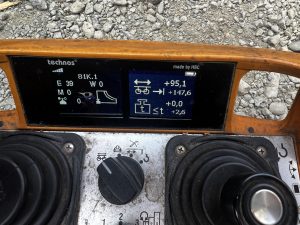
Disabling AMCS Anti-Collision
After another crane is removed from the job site, this is the procedure to disable AMCS anti-collision system
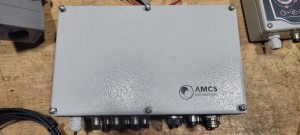
Locate the main AMCS
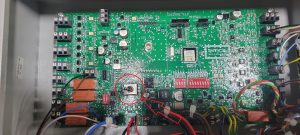
Switch off the silver toggle
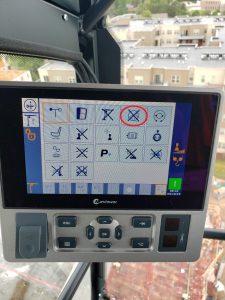
Disable Anti-Collision in the CCS Configuration Menu (an “X” through the icon means its disabled)
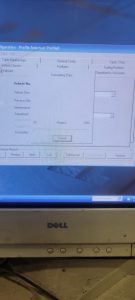
Fuel Computer Menu
Start Computer, and choose user Rod Kesler

Click on AFC icon on desktop

Login as user: afc and password: afc
Click on Setup/Configuration to access all tabs to be edited

Once changes are made, you to send files to outside control box. Click on Transfer Data, and Transfer All Tables to AFC

Wait for progress bar to complete, and verify changes on control outside
Unlisted Technician Videos
This playlist is only accessed by having a direct link. Do not share this link with anyone outside of RMC
- Hup CAN control card install
- Liebherr working electrical panel
- Holder Tractor service reset
- ACS380 Drive warning reprogram
- High gain receiver dip switch programing –V3 Remote control
- Basics of AMCS
- How to remove contactor from Din rail
- Weathervane microswitch replacement
- How to manually change Liebherr I/O’s from the PLC
MDT – Tech Tip Videos
Below is a library of videos. If you have a customer with one of these issues, send them the link to our Youtube channel to help free up your time.
LMI Fault Troubleshoot – Crane won’t start, how to access the fault stack Youtube Link
LMI service code – How to enter a service code using the LMI Youtube Link
Loss of cab power – Instructions to check for tripped circuit breaker Youtube Link
Turning off slew encoder – How to enter the VFD to turn off the slew encoder Youtube Link
Checking Correct Power and Phase – Where to look for the correct phase Youtube Link
Switching from 4 part to 2 Part – How to switch the hook block Youtube Link
Custom operator controls – How to change or adjust the operator controls Youtube Link
Emergency hoist release – How to lower a load without crane power Youtube Link
CCS Serial number lookup – How to lookup the serial # in the processor Youtube Link
Inputting a new serial number into CCS – How to input a new serial # into the processor Youtube Link
Manual weather vane – How to put Topless cranes into weather vane manually Youtube Link
Wireless Remote Diagnostics – How to check the functionality of the wireless remote Youtube Link
Weathervane detection microswitch replacement – How to locate and remove the weathervane detection microswitch. Youtube Link
Hup – Tech Tip Videos
Below is a library of videos. If you have a customer with one of these issues , send them the link to our Youtube channel to help free up your time.
Hup remote Functions – Remote button, switch and screen displays. Youtube Link
VFD Location and Error code – Location of VFD’s, Breaker locations, and Where to look for error codes. Youtube Link
Hup Handheld remote – How to plug in and start crane with wired handheld remote Youtube Link
Checking power – How to check voltage at the filter. Youtube link
Manual weather vane – How to manually engage weather vane and confirm it is in weather vane via the remote Youtube Link
Automatic weather vane – how to activate the weather vane with push button Youtube Link
Hoist block and trolley at end of shift – Where to place the trolley and hoist block to help when ice/snow accumulation develops Youtube Link
Fast Charge Battery – How to remove and install batteries Youtube Link
Taking out of weather vane – How to get into work mode and confirm you’re out of weathervane. Youtube Link
Daily inspections – Base Level, Power cable inspection, Wire rope inspection, Trolley inspection Youtube Link
Start instructions – How to start with a generator, connect remote and confirm connection Youtube Link
Weathervane to working mode confirmation – Hup with dual slew motors. Youtube Link
Wireless Remote Diagnostics – How to check the functionality of the wireless remote Youtube Link
Igo T-70-T85-T130 Tech Tip Videos
Igo T70, T85, T130 Tech Tip Playlist
Below is a library of videos. If you have a customer with one of these issues , send them the link to our Youtube channel to help free up your time.
Manual weather vane – How to properly put the crane in to weather vane manually Youtube Link
VFD’s – Their location and where to look for error codes. Youtube Link
Twisted power cable – How to enter the processor to turn off limits and unwind the twisted power cable Youtube Link
Weather vane – How to put the crane into and out of weathervane Youtube Link
Cordless Remote Functions – Key location, Startup screen and address, Joystick functions, Estop, and the screen functions Youtube Link
Phase detection – Where to look to confirm phase is correct Youtube Link
Checking incoming power – Where to check for the correct power required to run the crane Youtube Link
Erection aid help – How to access the processor to the erection aid screen Youtube Link
Maintenance screen – How to access the processor to the Maintenance screen. Youtube Link
Corded Remote install – How to install the corded remote Youtube Link
Auto slew greaser location – Where to locate the auto greaser and how to refill Youtube Link
Turning off slew encoder – How to enter the VFD to turn off the slew encoder Youtube Link
LMI Fault Troubleshoot – Crane wont start, how to access the fault stack (cab mounted cranes) Youtube Link
LMI service code – How to enter a service code using the LMI(cab mounted cranes) Youtube Link
Loss of cab power – Instructions to check for tripped circuit breaker (cab mounted cranes) Youtube Link
Functioning electrical panel walkthrough – An overview of what is in the panel Youtube Link
Jib retaining pin issues – Location of the flipper switches, the validation button and winch pin. Youtube Link
Automatic weather vane – How to visually tell you are in weather vane Youtube Link
Remote Address and Frequency group – how to access the processor for the remote address and frequency group Youtube link
Active relays and switches – Which relays and switches are active on a working crane Youtube Link
Processor receiver inputs – How to access to processor for the inputs Youtube Link
Reading windspeed from the processor – How to access the processor to read windspeed Youtube Link
Jib retaining pin screw cleaning – The procedure to cleaning the threads Youtube link
Trolley Error – When the panel Light burns out, the trolley starts to error out Youtube link
Memory card replacement – How to replace the memory card on the slew drive. Youtube Link
Weathervane to working mode confirmation – Newer model T85 Youtube Link
Major Electrical Components – A description of the major electrical components in the panel of a T85 Youtube link
Jib Position Switch – Use loses hoist function- this may be the jib position switch has been changed Youtube Link
Wireless Remote Diagnostics – How to check the functionality of the wireless remote Youtube Link
Liebherr 81K.1 – Tech Tip Videos
Youtube Playlist link for liebherr 81k.1
Below is a library of videos. If you have a customer with one of these issues send them the link to our Youtube channel to help free up your time.
Remote Functions – How to start the crane and what is on the display. Youtube Link
Weather Vane – How to put the crane into weather vane mode. Youtube Link
Operator greasing locations – How to grease the slew ring assembly Youtube Link
VFD Error screen location – Where to look for errors codes on VFD’s Youtube Link
Corded/Wired remote install – How to hook up the wired remote to troubleshoot wireless remote issues Youtube Link
Luffing Jib tip 45° – How to place the remote into the correct setting to raise and lower the jib tip. Youtube Link
Battery Charger Fuse – Location of the battery charge fuse Youtube Link
Lost memory – reconfiguration – Liebherr 81k.1 Will not respond to remote inputs, it may have lost configuration. This video will show how to reconfigure the crane if that info has been lost. Youtube link
Mast Maintenance and Repair
Info on Mast Maintenance and repair along with how to shim mast
Multiquip generator starts and dies immediately
After cranking the first time, the Overcrank and Overspeed lights come on. When attempting to restart, only Overcrank and Overspeed lights come on, but the generator will not crank. Opening the control panel, can flip the switch Maintenance mode and generator starts, but will not shut off. The 15 amp mini blade fuse behind the control panel is blown.