
Must lower Jib tip to the ground. ( Cab cannot be on!!)
Make sure to be aware of the different password you must enter to get into these settings.
We went as low as we could in California, which was 90%
T85 and HUP 40/30
14’8″ center to center 20’8 7/8″ Diagonal
HUP 32/27
13′ Center to Center 18′ 4 5/8″ Diagonal
Liebherr 81k.1
14′ 9″ Center to Center 20′ 10 5/16″ Diagonal
Justen from CLS called and said the remote was showing Comm Error. Talking with Tomas, it is the data being sent from receiver to the remote (transmitter) for the display. Check the connection at the receiver with the red antenna for loose or corrosion at the connection. Also, check inside the remote there is an antenna that can come loose or fall off. If all looks good, need to replace both receiver and transmitter.
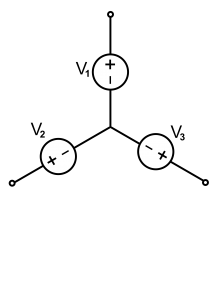
Pictured is a standard “Wye” connection. First test is the “megger” test which measures resistance to ground. Should be 800-900 Mega ohms (MΩ) resistance (our tester reads up to 500 Mega ohms)
In theory they all share the neutral in the middle, and testing only 1 leg should be sufficient, but this isolates each leg
Next test is a resistance of the windings for each leg
Final test would be current draw on each leg, but would require an amperage clamp and ability to run motor continuously.
Need to follow the directions on how to turn off the 3130 Error Code on the swing drive.
Must be at that stage of erection and switch to work mode on the remote. Go into the drive and get to the 31.21 screen switch remote back to erection and you have to switch it from 1 to zero before it kicks you out.
Need to have guy stand in cab while letting cab down onto pegs
Dustin,
Yes, the Fault can be changed in screen 31.21 to No Action. We can try this and see if that eliminates the issue. The suggestion from ABB is to download the ABB diagnostic software and map the DC voltage from the drive to the motor during this Fault condition time. Also, my contact suggested calling the ABB tech support line (1 800 4357 365) and start a case. The technician from ABB may have prior experience with this issue and provide more guidance. You will need the drive model and serial number for the call.
Chuck Burton
Product Trainer/Technical Services
Doosan Portable Power
1293 Glenway Drive
Statesville, NC 28625
T 704.883.3669
M 336.469.4835
chuck.burton@doosan.com
www.doosanportablepower.com
8528 is pass to get into drive under folder 96
Update as of 1/17/2019 – Turning off 31.21 (0) allows both the Wacker G25 and Doosan generators to erect Hups without fail (3130 code on slew drive). The status of 31.21 will automatically revert to (1) or active.
On slew drive press <ENTER> and down arrow until the Gear Cog (settings) shows. Press <ENTER> at the file folder icon and scroll to 96 and press <ENTER>. Scroll to 96.02 and enter code above. Press <EXIT> to get to 31 and press <ENTER> and <ENTER> again at 31.21. Change to <0>
Menu 3-5-5
Went to stand up HUP getting Error 7831 on drive. Encoder feedback error
Confirmed top site was off
Went into Derating and turned off options for the encoder.
Waiting to see if we can turn back on once we stand up
***Once the encoder was turned off, found that the crane would not slew. The slew motor with the encoder (the one to the right as you face the control panel) was not releasing the brake. Freed up brake, crane would slew and reactivated the encoder***