
Crane only moves at slowest speed with all functions
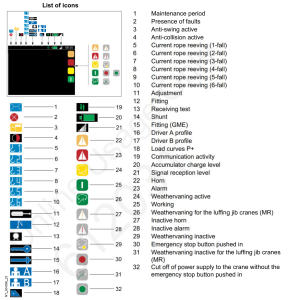
Customer was operating MDT crane with remote, but all functions were slow. Had the following icon on the display of the remote:

Crane was in P+ mode, which allows for greater capacity, but slows function. On the remote this is controlled with ” A-B ” switch.
In the cab this is controlled by the gray button on the top of the left joystick.
Weathervane adjustment for MDT Tower Cranes
Make sure both motors are adjusted per instructions.
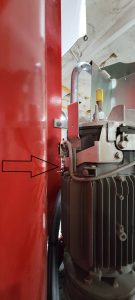
If the weathervane light does not display on LMI or the remote, adjust the microswitch as follows.
With the motor in weathervane and the brake is locked in the release position. Adjust the blade that contacts the microswitch. Careful to make sure the blade just contacts the microswitch and doesn’t smash the switch.
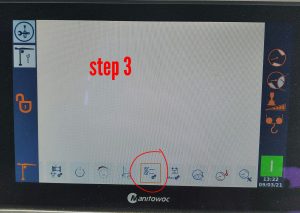
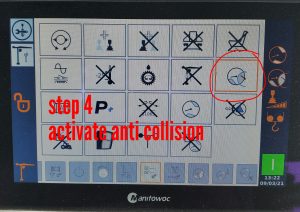
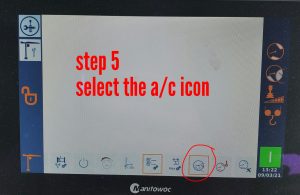
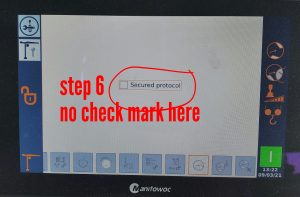
AMCS Turning on Anti-Collision
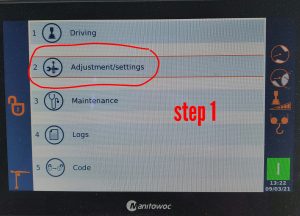
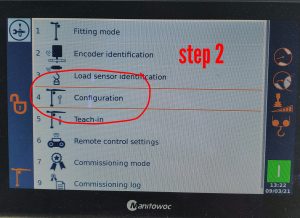
To activate the anti collision on the CCS.
After activation you must reset the crane power.
Potain Procedure for Removing Twist in Hoist Rope
Motor Encoder shuts down crane when fails
Change the parameter in the slew drive to warning instead of fault.
- Make sure the crane is powered off
- Connect remote to Ethernet cable and the other end to the top of the ACS 380 drive
- Start crane
- Select MENU
- Select PARAMETERS
- Go to menu 96 and select menu 96.02 (Pass Code)
- Enter code <8528>
- ESC back to menu 90.45 (Motor Feedback)
- Change 90.45 to WARNING (1)
- ESC back to menu list
- Verify Menu 96.10=4 (work)
- Go to Menu 96.11 and select Option 18 (be sure it is 18!!!!)
- Allow change to save to drive
- Go back to 96.11 and select Option 1
Checking oil on MDT hoist gearbox

Remove plug at 3 o’clock position. Oil level should be at threads or 1 CM below.
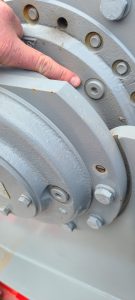
To fill, rotate hoist drum until one of the fill plugs is at 12 o’clock. Use APG 150 oil.
Hoist drive shuts off immediately after it starts E65 code
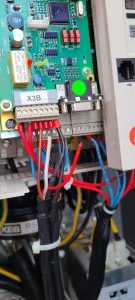
When trying hoist or lower line, drive immediately shuts off. Display on drive E65. The drive is not receiving a signal from speed sensors (there are 2 on the motor). Found 2 broken wires at crimped terminals on Speed Card (X3B).
Placing KEB Drive in Degraded Mode
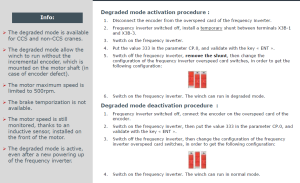
To place KEB drive in a mode where it does not look for speed sensors, must be placed in Degraded Mode. Follow the steps in link below and also steps to put back into normal mode.
Can not apply more than 30% of speed or drive will shut down. (E66 code in degraded mode)
On MDT389, this did not work. Here are the other procedures, per JP.
75HPL Degrade Mode Instructions
Heater not Working in Cab of MDT219
Operator called and complained that the heater in the cab was not working. Wipers worked, and when switched over to AC the light would come on but no fan.
Had the operator power down the crane and unplug the KP plug and plug it back in. Heater started working again.
In case needed:
Q131A Heater Circuit Breaker
Q340A & Q342A Wiper Circuit Breakers
Q362A AC Circuit Breaker