Disabling AMCS Anti-Collision

After another crane is removed from the job site, this is the procedure to disable AMCS anti-collision system

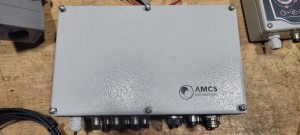
Locate the main AMCS

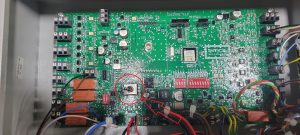
Switch off the silver toggle

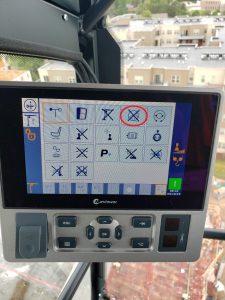
Disable Anti-Collision in the CCS Configuration Menu (an “X” through the icon means its disabled)

MDT – Tech Tip Videos

MDT Tech tip Playlist

Below is a library of videos. If you have a customer with one of these issues, send them the link to our Youtube channel to help free up your time.

LMI Fault Troubleshoot – Crane won’t start, how to access the fault stack Youtube Link

LMI service code – How to enter a service code using the LMI Youtube Link

Loss of cab power – Instructions to check for tripped circuit breaker Youtube Link

Turning off slew encoder – How to enter the VFD to turn off the slew encoder Youtube Link

Checking Correct Power and Phase – Where to look for the correct phase Youtube Link

Switching from 4 part to 2 Part – How to switch the hook block Youtube Link

Custom operator controls – How to change or adjust the operator controls Youtube Link

Emergency hoist release – How to lower a load without crane power Youtube Link

CCS Serial number lookup – How to lookup the serial # in the processor Youtube Link

Inputting a new serial number into CCS – How to input a new serial # into the processor Youtube Link

Manual weather vane – How to put Topless cranes into weather vane manually Youtube Link 

Wireless Remote Diagnostics – How to check the functionality of the wireless remote Youtube Link 

Weathervane detection microswitch replacement – How to locate and remove the weathervane detection microswitch. Youtube Link 

Slew Drive shuts off during acceleration

Slew drive starts up normally, and begins to swing, but coasts to stop and drive shuts down with code 7510 (FBA A comm loss func).  Could not get code to clear or swing to operate.  Checked CanOPEN card and both status lights looked good.  FEN 31 (encoder card) also had 2 green lights, but tried to remove encoder connectors and still could not get to work.  Per JP’s recommendation, remove LFC and CCL plugs and install jumpers.  Remove network cables from Trolley and Hoist drives.  Restart crane and test swing, and it works normally with no faults.  Plugged back in trolley network cable, and swing would still work.  Plugged in Hoist network cable and Swing drive would fault without Hoist drive even being turned on.  It was determined that there was a fault in the keypad of the Hoist drive.  Replace keypad and crane worked normally.


*For notes.  JP determined there was a fault in the communication system (FBA A Field Bus Adapter), but wanted to isolate what it was.  It was a communication fault through the Can Bus system.  By isolating just the swing drive and swing encoder, we could start to determine it was either of those.  If the Hoist keypad hadn’t caused failure, we would have added back the LFC and CCL plugs 1 at a time to determine if it was a communication fault in the drives, or encoders which also communicate through the Can Bus.  Also note that CAN H and CAN L should produce approx 2.5 VDC to “-” on terminal strip.  This could determine if there is a short to ground.  If the voltage is 0 or low, begin unplugging devices until voltage is restored

HUP will not accept Zero Load

After software upfate, in which SCM and CCT were erased, crane would not accept Zero Load during teach in.  Need to repair loadpin, and re teach Zero load.