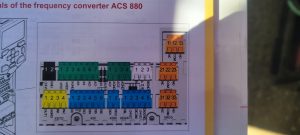
TA19-149-A – ACS880 SLEWING CONVERTER MESSAGE AFE1 AFEB (OFF2) FIP CARD_EN
Bypass FIPO card per bulletin
If adding shunt, add to Blue 5 Pin connector at terminals #3 and #5

Rocky Mountain Crane Service Logs
TA19-149-A – ACS880 SLEWING CONVERTER MESSAGE AFE1 AFEB (OFF2) FIP CARD_EN
Bypass FIPO card per bulletin
If adding shunt, add to Blue 5 Pin connector at terminals #3 and #5
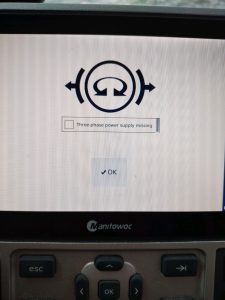
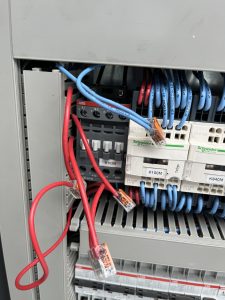
Operator complains crane will not start and the display shows Three phase power supply missing. Check for incoming power and all 3 phases. If power is correct on each of the three legs (277 VAC), check contactor K102M. A1 terminal should be receiving 277VAC on the A1 terminal. If that is correct, coil in contactor may be bad. Remove wire from terminal 22, hold in contactor and start the crane. If crane starts and runs, the contactor coil has failed.
To bypass contactor K102M wire the incoming and outgoing 3 phase wires together and disconnect terminal 22 on K102M. This will allow the crane to function until the K102M can be replaced.
Potain part # for K102M = 84034156
After software upfate, in which SCM and CCT were erased, crane would not accept Zero Load during teach in. Need to repair loadpin, and re teach Zero load.
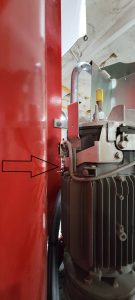
Procedures from the manual for proper adjustment of the microswitch on the hoist brake
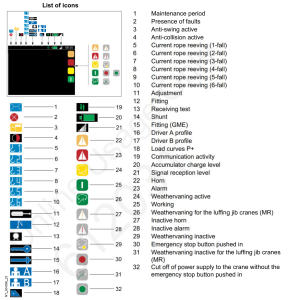
Customer was operating MDT crane with remote, but all functions were slow. Had the following icon on the display of the remote:

Crane was in P+ mode, which allows for greater capacity, but slows function. On the remote this is controlled with ” A-B ” switch.
In the cab this is controlled by the gray button on the top of the left joystick.
Make sure both motors are adjusted per instructions.
If the weathervane light does not display on LMI or the remote, adjust the microswitch as follows.
With the motor in weathervane and the brake is locked in the release position. Adjust the blade that contacts the microswitch. Careful to make sure the blade just contacts the microswitch and doesn’t smash the switch.
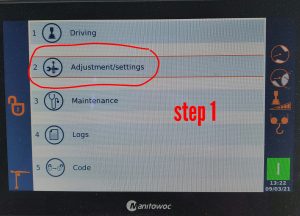
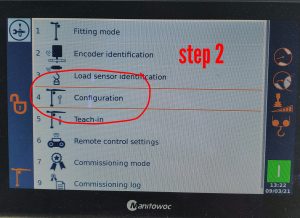
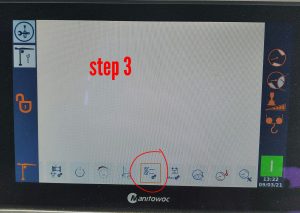
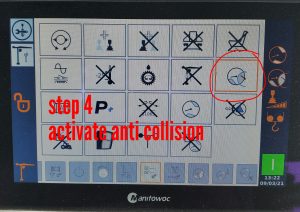
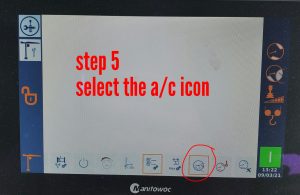
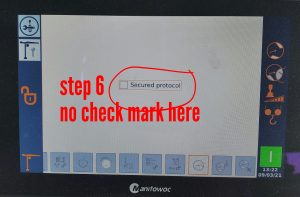
To activate the anti collision on the CCS.
Operator says fan not blowing and AC unit was not switching on. Had to reset circuit breaker Q362F